01. Easy Light Socket Installation
A simple screw-in design that avoids drilling separate camera mounting holes.

🎁The first 100 orders per day will receive double the product
🔥92.8% of Customers Buy 2 or More🔥
Couldn't load pickup availability
-
Ordered
- - -
Order Ready
- - -
Delivered
Enjoy fast shipping on all orders. Need extra peace of mind? Upgrade to secured shipping at checkout for added protection.
Every order ships next business day in discreet packaging for your privacy.
Not satisfied? No worries — we’ve got your back. Return your order within 30 days for a full refund, no questions asked.

Smarter home monitoring, made simple
Want to check your front door without installing a complicated security system? Simply fit this camera into a compatible light socket, connect it to your phone, and keep an eye on home wherever your day takes you.

See it in action
Take a closer look at the camera in a real home setting, from installation to checking the view on your phone.
A simple screw-in design that avoids drilling separate camera mounting holes.

See the type of light fixture used in this demonstration.

See how the camera feed appears when checking your home from the app.
Swipe to explore all three demos →
Skip the complicated setup
Forget mounting brackets and extra camera wiring. This bulb-style camera uses an existing compatible light socket, so getting started is much easier.

Easy to get started
Switch off the power, screw the camera into a compatible socket, then restore power and connect it through the app. The built-in AP hotspot also supports direct local viewing nearby.

When life takes you away from home
Waiting for a package while you're at work? Open the app to check your front door. If a delivery driver or visitor arrives, two-way audio lets you speak through the camera. You can even share access with family so everyone stays connected.

More ways to look around
A fixed camera angle doesn't always show what you need. Use the supported app controls to adjust the camera's viewing direction and check more of your space.

Stay aware after dark
Wondering what that noise was outside? Infrared night vision helps you see in low light, while motion detection can alert your phone when activity is detected. Check the live view whenever something catches your attention.

Flexible monitoring options
The built-in AP hotspot lets you connect directly to the camera when you're nearby, even without a home router. For remote viewing from work or another location, the camera uses a supported internet connection.
A closer look
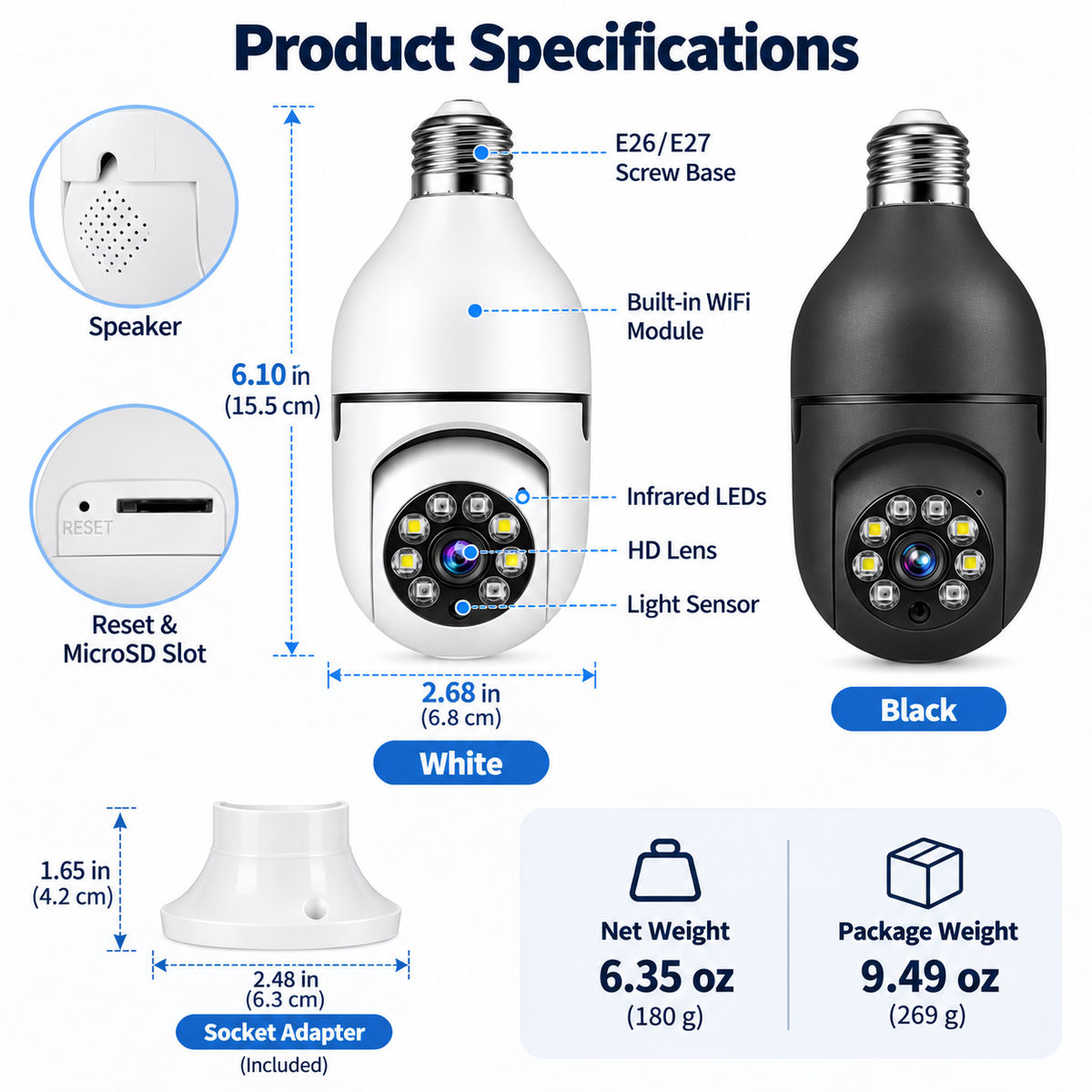
Available in white and black, the bulb-style design measures about 6.1 inches tall. Check that your light fixture has enough space for the camera before ordering.

Customer feedback
1,477 reviews
Customer feedback on the design, setup, and details that matter when choosing a camera for home.
Handy for checking the front door. I like the idea of having the camera built into a bulb, though I'd definitely check the socket and measurements before ordering. Getting the motion alerts set up in the app is worth looking into as well.
A pretty straightforward idea for home monitoring. For an entryway, I'd mainly want to make sure the Wi-Fi reaches the camera and that it's pointing where I need it. Worth checking the exact features for the model you're getting.
I like the screw-in design, but it's worth taking a minute to check the size and socket type. I'd also make sure there's a decent Wi-Fi signal wherever you're planning to put it.
The two-way audio is a nice feature to have. Being able to listen and talk through the app sounds really useful, as long as it's supported and set up correctly. Just follow the instructions and switch the power off before installing it.
Being able to check the camera from my phone is the main thing that appeals to me. The bulb design also makes sense if you don't want another camera mounted on the wall. Just make sure the socket matches your setup.
I do like how convenient the bulb-style design is. I'd pay attention to the Wi-Fi coverage and where the camera will be installed, since those things can make a difference. It's worth checking which app features are included too.
Good to know
A few helpful details about setup, phone viewing, and everyday use.
Turn off the power, screw the camera into a compatible light socket, restore power, and follow the app instructions. No separate wall-mounted camera bracket is needed.
Yes. Once the camera is connected to a supported internet network, you can use the compatible app to view it remotely.
The advertised two-way audio feature lets you listen and speak through the compatible app when connected and configured.
The camera includes advertised infrared night vision for low-light viewing. Image quality depends on distance, lighting, and placement.
The camera supports advertised motion detection and phone notifications. Configure the feature in the app and allow notifications on your phone.
Its built-in AP hotspot supports nearby local viewing. Remote viewing requires internet access. Offline recording depends on compatible storage and camera settings.
Multi-user sharing is an advertised feature. Access can be shared using the supported app and its available permission settings.
Not necessarily. Check the camera's actual screw base, voltage rating, and dimensions before buying. E26 and E27 compatibility should be verified for the specific version.
Basic app access and optional cloud recording may have different terms. Check the app provider's current free and paid features before ordering.
Outdoor use depends on the exact model's weather rating and installation environment. Confirm suitability before exposing it to rain, snow, or extreme temperatures.
Yes. The camera uses electricity from the light socket, so it must remain powered whenever monitoring is needed.
Shop with confidence
Review shipping options, return eligibility, and support details before placing your order.
A simpler way to stay connected
From checking a delivery to speaking with a visitor or looking in on the living room, staying connected to home doesn't have to be complicated. Choose your preferred color and enjoy a simpler way to check in.